Features
VARA HF
- Bandwidths of 500, 2300 and 2750 Hz, set by the client's
BWcommand or in the configuration. - All speed levels, L1 to L17, from FSK through PSK to OFDM with QAM. The level follows the channel by VARA's rules.
- ARQ links: connect requests with retries, acknowledgements, repeats, keep-alive polls, chat links, disconnects and link time-outs.
- Compression: TEXT, FILES or OFF, set by the client's
COMPRESSIONcommand. - KISS broadcasts (APRS and other AX.25 UI frames, or raw KISS data) and CQ frames, sent and received.
- CW ID after a link: for US-format calls, or after every link if you turn it on.
- A stub engine (
--engine stub) that answers on the ports without a radio, for checking a client's set-up.
VARA FM
Start the modem with --fm narrow or --fm wide to use VARA FM on the same ports.
- Narrow: 12.5 kHz channels, levels 1 to 11, up to about 12 kbit/s. Works through any FM radio's audio.
- Wide: 25 kHz channels, levels 1 to 13, up to about 25 kbit/s. Needs a flat audio path to about 6 kHz, such as a 9600-baud packet port. A wide station answers a narrow call with a narrow link.
- Connections through up to two digipeaters (
CONNECT MYCALL TARGET VIA DIGI1 [DIGI2]), and VerityRF Modem can act as a digipeater itself (--digi CALL). - VARA FM's host-interface differences, KISS broadcasts and CQ frames.
Host interface
| Port | Use | Default |
|---|---|---|
| Command | VARA's commands (MYCALL, LISTEN, CONNECT, BW and others) and replies | 8300 |
| Data | The link's data, both ways | 8301 |
| KISS | KISS frames sent and received as broadcasts | 8100, off by default |
| Status | JSON lines for the desktop app or other monitoring | 8310, off by default |
The ports listen on 127.0.0.1 unless you change it. They have no authentication, so only
open them to other machines on a network you trust.
There is no registration key. You enter your licensed call, and links from that call or its SSIDs are reported as registered, as a registered VARA reports them.
PTT
| Method | How the radio is keyed |
|---|---|
host | By the client, on the PTT ON / PTT OFF lines (the default) |
vox | By the radio's VOX |
rigctld | Through hamlib's rigctld, for any rig hamlib supports |
serial | The RTS or DTR line of a serial port |
cm108 | A GPIO pin of a CM108 or CM119 USB sound card |
Lead and tail times can be set. A maximum key-down time (30 s by default) releases rigctld, serial or CM108 PTT if a transmission runs too long.
Desktop app
- Monitor: link state and peer, PTT/BUSY/CONNECTED/REGISTERED indicators, S/N, speed level, data sent and received, spectrum and waterfall, input level, and lights for each kind of burst sent and heard.
- Constellation of the last good frame received.
- Activity log, which can be copied or saved to a file.
- Audio: spectrum and waterfall, input level, drive level, and TUNE for setting the radio's ALC.
- Session: a summary and timeline of the last link, the event log, and a command line for host commands.
- Settings: every configuration option, with test buttons for PTT.
- Light and dark themes, a tray icon, and a demo mode that needs no radio.
Observer
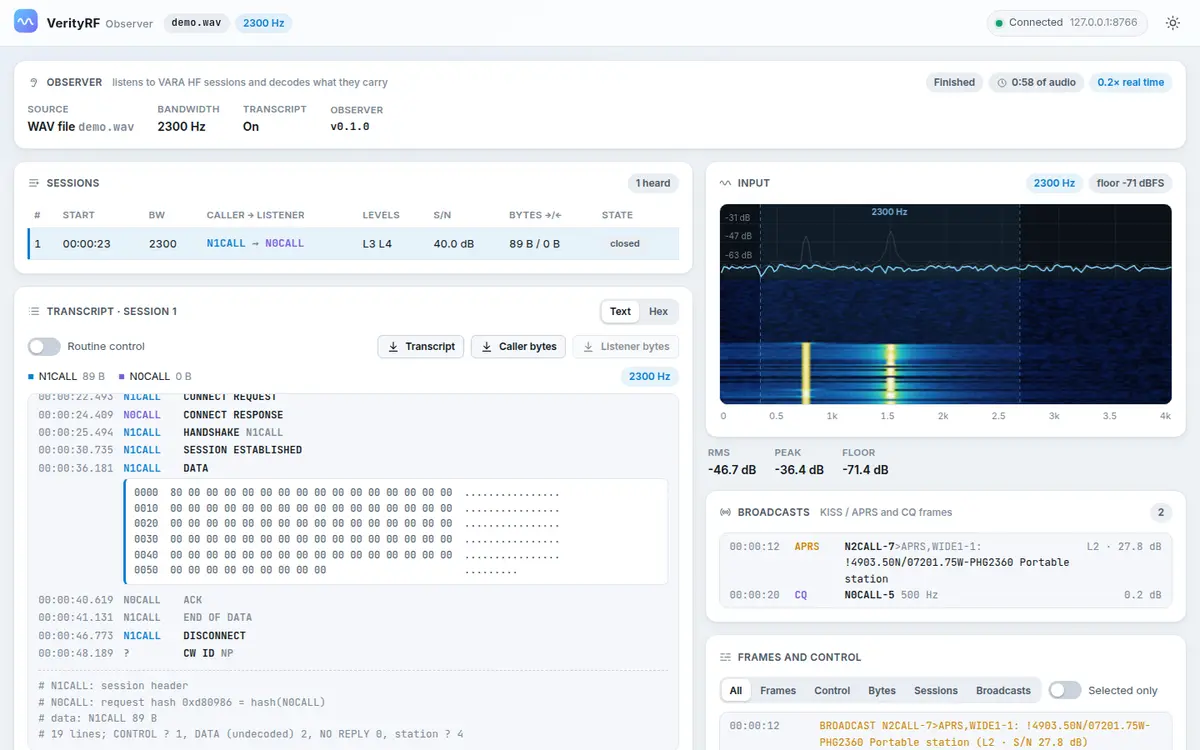
verityrf-observer listens to VARA HF sessions between other stations. It does not transmit.
- Input from a sound card, a WAV file at any sample rate, or raw audio on standard input.
- One session at a given bandwidth, or
--monitorto follow one session after another at 500, 2300 and 2750 Hz. - Output as frames and control bursts, as a transcript, or as JSON.
- KISS/APRS broadcasts and CQ frames heard.
--httpserves a read-only web page with the sessions, transcript, spectrum and broadcasts;--http-tokenrequires a token to view it.- The desktop app's Observer view runs it for you.